
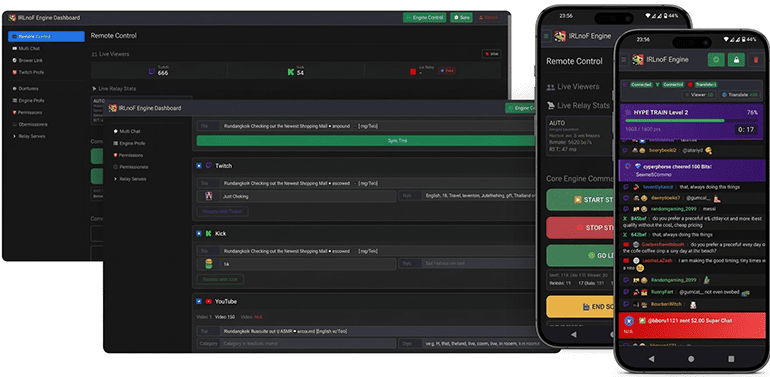
IRLnoF Stream Engine is a comprehensive, cloud-hosted stream management and remote control dashboard designed specifically for IRL live streamers, broadcasters, and content creators.
Purpose of the Application
For IRL (In Real Life) streamers, updating stream metadata while out in the field is a notorious challenge. Official mobile apps and browsers often heavily restrict access to live control rooms, especially on YouTube, where modifying an active stream's title, category, or tags from a smartphone is frustratingly difficult and sometimes impossible.
The primary goal of the IRLnoF Stream Engine is to solve this exact problem. It provides broadcasters with a single, mobile-optimized unified control panel to bypass these restrictions. You can seamlessly monitor video relays, control OBS instances remotely, and instantly sync live broadcast metadata across multiple streaming platforms (YouTube, Twitch, and Kick) with just a few taps.
The application works as an automated digital director running in the background, acting as a bridge between the IRLnoF cloud dashboard, streaming platforms, and your local broadcasting software such as OBS.
How the Application Works
IRLnoF Stream Engine continuously monitors and manages your live streaming environment through automated systems:
- Smart Auto-Scene Switcher: The engine monitors video connection health, including bitrate and latency across relay servers. If a connection issue is detected, it can automatically instruct OBS to switch to fallback scenes such as Low Bitrate or Offline. Once the connection recovers, it can automatically return to the Live scene.
- Chat Command Control: The application can connect with Twitch, Kick, and YouTube chat systems, allowing authorized users or staff members to control OBS remotely using predefined chat commands.
- Automated Raid Protection: Using Twitch EventSub integration, the application can detect incoming raids and trigger configured actions such as countdown sequences, scene changes, or stream shutdown procedures.
- Real-Time Cloud Synchronization: The engine synchronizes configuration changes with the IRLnoF dashboard. Updates such as scene names, bitrate thresholds, and authorized moderators can be applied dynamically without requiring an application restart.
- Crash Protection & Safe Parking: When a stream ends or requires shutdown, the application can automatically switch OBS into a safe parking or refresh scene to reduce unnecessary CPU and GPU usage.
Key Features & Platform Integrations
1. YouTube, Twitch, and Kick Live Broadcast Management
- Metadata Sync: View and update active YouTube, Twitch, and Kick live stream titles, categories, and tags directly from the dashboard.
- Smart YouTube Stream Targeting: Automatically detects and locks onto the correct YouTube video ID. The engine prioritizes actively live streams first, then the earliest scheduled upcoming streams, before falling back to your default persistent stream key.
- Real-Time Analytics: Monitor active live stream status and concurrent viewer metrics.
- OAuth Security: Authenticate securely using official Google OAuth 2.0 protocols without exposing sensitive account credentials.
2. Unified Multi-Chat & Community Alerts
- Platforms Live Aggregator: Simultaneously connects to Twitch IRC, Kick, and YouTube Live to merge chat streams with channel badges and avatars.
- Emote & Custom Badge Support: Natively renders Twitch and Kick badges alongside full support for 7TV, BetterTTV (BTTV), FrankerFaceZ (FFZ), and Twemoji.
- Mobile Field Utilities: Includes an integrated Screen Wake Lock toggle (keeping mobile/tablet displays awake while streaming IRL) and on-the-fly Chat Translation to translate foreign chat messages into English instantly.
- Monetization & Event Alerts: Visually highlights high-priority stream events across platforms (Twitch Subs/Bits/Raids, Kick Subs/Hosts, YouTube Super Chats/Memberships/Jewels).
- Twitch EventSub Real-Time Overlays: Displays dedicated interactive status cards directly above chat for Hype Trains, Polls, and Predictions.
3. Twitch Raid Management System
- Owed Raid Queue: Save target streamer channels and track outstanding "owed" raids with an adjustable counter.
- Live Status & Metric Inspector: Automatically polls Twitch's API to show which targets are currently live, displaying real-time stream titles, categories, viewer counts, and live thumbnails automatically sorting live channels with the highest viewership to the top.
- One-Click Raid Execution & Abort: Initiate raids directly from the dashboard without needing chat commands, with the ability to cancel the 90-second countdown at any time.
- Automated Stream Teardown: Features an optional engine behavior to automatically trigger the stream shutdown sequence once the outgoing raid successfully completes.
4. Multi-Platform Title & Stream Control
- Synchronize stream titles and categories across supported platforms simultaneously (YouTube, Twitch, and Kick).
- Individual platform overrides allow stream settings to be managed independently.
5. Remote OBS Control & Switcher
- Trigger core scene switches (Intro, Live, Low Bitrate, Offline, Ending, BRB).
- Execute custom scene commands and toggle source filters through OBS WebSocket.
- Automated switching based on incoming bitrate and latency thresholds.
6. Live Relay Health Monitoring
- Track real-time bitrate, Round Trip Time (RTT) latency, and connection status for video relays.
Privacy & Security
IRLnoF Stream Engine respects user privacy and strictly adheres to the Google API Services User Data Policy:
- Data Access: YouTube data accessed via the API is strictly limited to reading and updating live broadcast metadata and fetching viewer statistics.
- Data Privacy: User data is never sold, leased, or shared with third parties.
- Control: Users can revoke access at any time through their Google Account Security Settings.
- Privacy Policy: View Privacy Policy
- Terms of Service: View Terms of Service
Access Dashboard
Registered users and authorized clients can access the active dashboard here:
Access IRLnoF Stream Engine Dashboard
